01
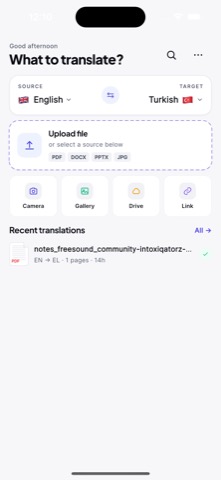
Choose languages and upload
Import a PDF, scan, or image, then choose the source and target languages for your document.
 AI PDF Translator
PDF translator for iPhone & iPad
Upload a PDF, scanned document, or image from your iPhone or iPad. Choose a language, compare the original with the translation, improve individual paragraphs, and export the result as a PDF.

iPhone workflow
Translate a document in three clear steps. The screenshots below come from the current app, so you can see the workflow before downloading.
01
Import a PDF, scan, or image, then choose the source and target languages for your document.
02
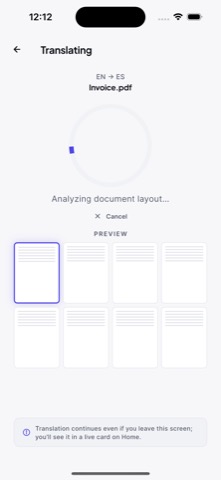
OCR reads text from scanned pages and images while the app processes the document page by page.
03
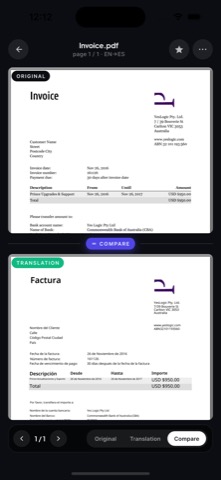
Review both versions together, improve individual paragraphs when needed, and export the translated document as a PDF.
Use cases
Translate files for school, work, travel, research, and quick document review without switching to a desktop workflow.
AI PDF Translator helps you turn dense PDF pages into readable translated text while keeping the original document close enough to review context, page flow, and important details.
Mobile appOpen a PDF on your phone, translate the important pages, and review the result without sending yourself files or waiting until you are back at a desktop.
AI translatorDocuments are not chat messages. They have structure, terminology, and context. AI PDF Translator is built around the way people read and verify translated documents.
Built for review
A useful PDF translation workflow does more than return a block of text. It helps you check names, dates, numbers, tables, and technical terms against the source before you act on the translation.
Translate PDF filesWork with reports, manuals, contracts, forms, invoices, study notes, and academic papers.
Review critical detailsCompare original and translated text before relying on names, numbers, dates, or terminology.
Handle scanned pagesUse OCR to translate text in scans and images, with clearer originals producing better results.
Languages
Choose a target language and see the best workflow for translating PDFs from your iPhone. Each guide focuses on practical review, scanned pages, and document details that need extra care.
Guides
AI can help you understand a legal PDF quickly, but binding and certified documents still need professional review.
Scanned PDFs are images of text. OCR is the step that makes them translatable, and its quality sets the ceiling.
Academic PDFs are dense and technical. Translate for understanding, then protect terminology, citations, and figures.
Long PDFs need a plan. Translate by section, keep a map of the document, and verify the pages that matter.
Google Translate can translate PDFs, but document workflows often need more review, OCR handling, and side-by-side comparison.
Free PDF translation can work for quick reading. Here is what the free route covers, and where it usually breaks down.
FAQ
AI PDF Translator is an iPhone and iPad app for translating PDFs, scanned documents, and images. It lets you compare the original and translation, improve individual paragraphs, and export the result as a PDF.
Yes. Import the PDF, choose English as the target language, and review the translated text against the original before exporting the result.
AI translation helps you understand documents, but official, certified, legal, medical, and financial documents should be reviewed by a qualified professional.
Ready to translate?
AI PDF Translator is free to download. Import a PDF, scan, or image and review the translation alongside the original.