best PDF translator app
How to Choose a PDF Translator App for iPhone & iPad
Choose a PDF translator app by checking imports, OCR, language support, comparison, PDF export and pricing against your own documents.
The short answer
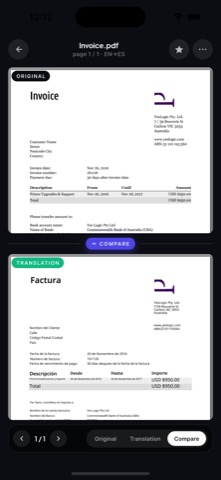
Choose a PDF translator app that accepts your files, supports your language pair, reads scans when needed and lets you check the translated output against the original. On iPhone and iPad, AI PDF Translator provides a mobile workflow with OCR, comparison and PDF export. Test a representative page before choosing a subscription.
Start with the document and device
List where your PDFs arrive: Files, email attachments, browser downloads or cloud storage. Make sure a cloud file is downloaded before trying to import it. A desktop translator can be useful at a computer, but an iPhone workflow should let you open and review the file on your phone.
Check whether you need OCR
Select a sentence in the original PDF. If you cannot select text and the page behaves like a picture, check the app’s scan support. Try a page containing small print and numbers. OCR mistakes happen before translation, so a fluent result can still contain a misread date or reference number.
Inspect the comparison and export workflow
Look for a way to move between the source and translation without losing your place. In AI PDF Translator, the comparison view is intended for that review. After exporting, reopen the PDF and inspect headings, tables and the longest paragraphs; translated text can occupy more space than the source.
Make a small, repeatable evaluation
Use the same permitted sample document when evaluating tools. Record the language pair, source page count, scan quality, errors you noticed and whether the exported file remains readable. Avoid using an invented accuracy percentage: a ten-line letter cannot establish performance on contracts, tables or academic papers.
Compare allowances before paying
Check page limits, file size limits and current in-app prices. AI PDF Translator is free to download; that does not mean unlimited translation. Its separate web trial includes one PDF per Google account, only the first 10 pages and files up to 50 MB. Choose a tool based on the job you need to complete.
What this guide does and does not establish
This is a checklist published by the AI PDF Translator team, not an independent comparison or a tested ranking of competing apps. We show our own product workflow and recommend checking the result on your documents. No app can make every language pair and document layout error-free.